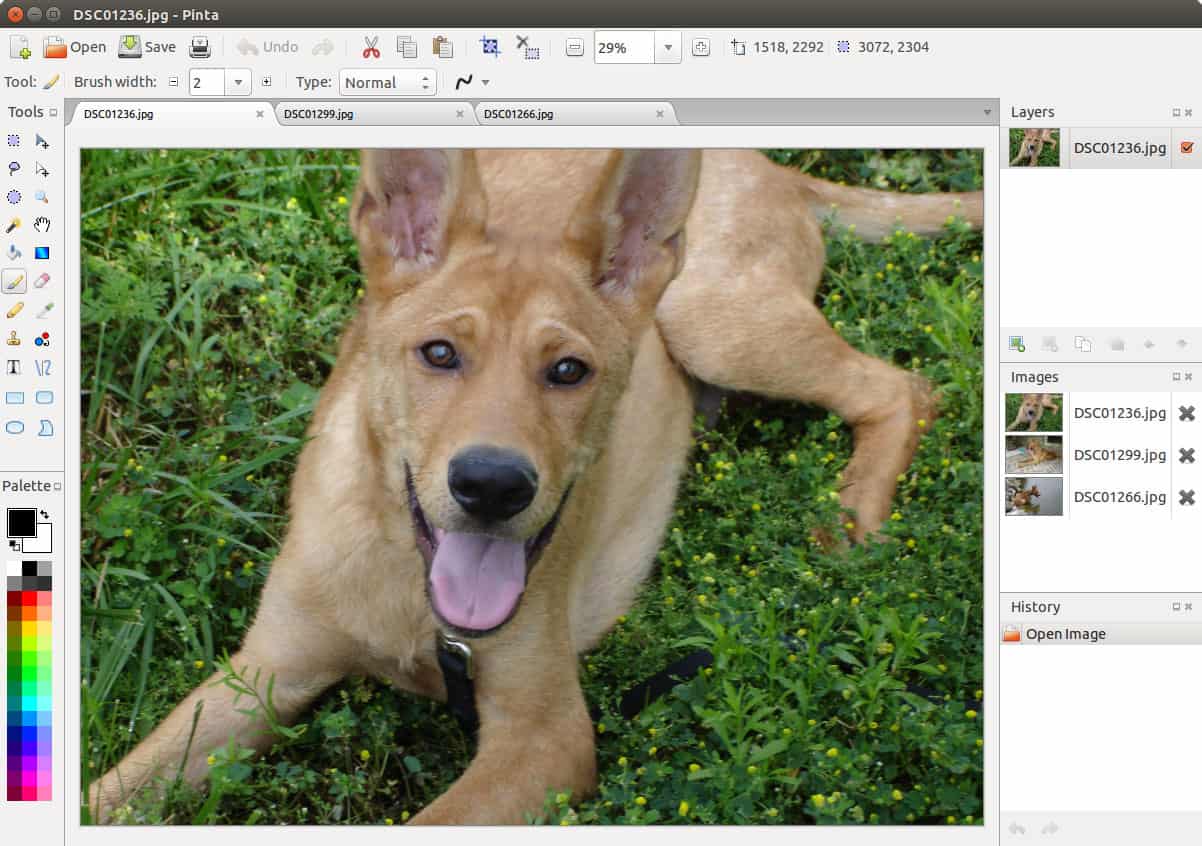
Pinta är ett bildredigeringsprogram som har en hel del av det som mer avancerade och inte minst dyrare program har men Pinta är gratis.
Du kan rita med Pinta och du kan redigera dina bilder.
Pinta is a free, open source program for drawing and image editing.
Its goal is to provide users with a simple yet powerful way to draw and manipulate images on Linux, Mac, Windows, and *BSD.
What’s new in version 3.1
Added
- Implemented a new axonometric grid (View > Canvas Grid… > Show Axonometric Grid) (#1438, #1541)
- Rewrote the canvas widget to improve performance and memory usage issues for zoomed-in images (#1020, #1485)
- Added a new Cells effect (#1589)
- Added a polygon selection mode to the Lasso Select tool (#1725, #1096)
- The Gradient tool now provides handles for adjusting the gradient length and direction (#1533, #1773)
- The ”About” dialog now includes links to the issue tracker and discussion forum (#1343)
- When compiling Pinta, the GirCoreSource MSBuild property can be set to easily build Pinta against a local build of gir.core for easy debugging (#1403)
- Keyboard shortcuts are now displayed on all toolbar button tooltips (#1408, #1432)
- Added a right click menu for layers, containing actions that can be applied to the selected layer (#1588)
- The Dithering effect can now use Pinta’s current palette in addition to the effect’s preset color palettes (#1594)
- Random seed values for effects can now be directly controlled, in addition to use the Reseed button (#1592, #1591)
- Support for color picking in SimpleEffectDialog. Useful for add-in developers (#1611)
- The text tool now supports using Ctrl+Backspace to delete words (#1680)
- Added a Windows ARM64 installer (#1699, #1378)
- The selection of an area on the canvas is now being projected and highlighted on the rulers (#1723)
- The selection outline is now animated for improved visibility (#1521, #1829)
- Added a Radius Percentage parameter to the Twist effect (#1739)
- The Splatter brush can now repeatedly draw while holding the mouse down (#1817)
Changed
- Packaging changes
- Updated dependencies to require GTK 4.18+ and libadwaita 1.7+
- Pinta now consistently uses an application ID of com.github.PintaProject.Pinta, which previously had been applied in patches for downstream packages (#1706, #1419)
- Breaking API changes for add-ins will require add-ins to be rebuilt against Pinta 3.1
- Attributes used for effect configuration properties (CaptionAttribute, MaximumValueAttribute, …) are now in the Pinta.Core assembly and the Pinta.Core namespace (#1665)
- Methods RegisterEffect, UnregisterInstanceOfEffect, RegisterAdjustment, and UnregisterInstanceOfAdjustment in EffectsManager are now generic (#1678)
- Removed use of deprecated Gtk.FontButton (#1421)
- View menu moved from hamburger menu to dedicated button (#1428, #1471)
- Updated the application icon on macOS to better match the platform’s icon style guidelines (#1572)
- Removed the blend mode parameter from the Clouds effect. The replacement workflow is to create a new layer and configure the layer’s blend mode (#1695)
- Transparent palette colors are now drawn against a checkerboard pattern for improved visibility (#1759)
- Saving an image with multiple layers to a format that does not support layers will now warn the user that the image is being flattened (#1856, #1283)
Fixed
- Fixed a bug where cancelling the color picker dialog could still update the palette colors (#1390, #1411)
- The text tool’s ”Normal and Outline” mode now draws the outline behind the text to avoid obscuring it (#1423, #1426)
- Improved the handling of negative angle values in the Rotate / Zoom Layer dialog (#1142, #1440)
- Fixed incorrect behavior with transparent colors in the Gradient tool (#1552, #1543)
- Fixed issues where the layer widget did not show the correct selected layer when switching documents (#1602, #1573)
- Fixed toolbar layout issues with displaying the cursor position and selection size (#1429, #1540)
- Fixed a potential hang when switching the active layer in a tool with uncommitted edits (#1463, #1660)
- Fixed a bug in the text tool where Ctrl+A only selected starting from the current line (#1698)
- The icon and window title now appear correctly on KDE Wayland sessions (#1419)
- Fixed bug where the text tool could incorrectly display a default cursor (#1707)
- Fixed drifting when holding Shift while expanding a rectangle selection using the vertical or horizontal handles (#1733)
- Fixed issue where icons were missing from the top bar (#1814)
- Fixed a potential error in the text tool when pressing Left at the beginning of a line (#1824)
- Fixed issues where mouse button releases were not correctly registered in certain situations (#1456, #1891)
- Fixed bug where copying did not include unfinalized text (#1666, #1894)
- Fixed issues with missing translations for libadwaita dialogs on macOS (#1877, #1417)


0 kommentarer